> For the complete documentation index, see [llms.txt](https://sg-mapping.gitbook.io/sg-mapping-documentation/llms.txt). Markdown versions of documentation pages are available by appending `.md` to page URLs; this page is available as [Markdown](https://sg-mapping.gitbook.io/sg-mapping-documentation/ev-chargers/configuration.md).
# Configuration
Below we have explained some of the key features found in our Config file within the EV Charging Script.
***
#### Framework
{% hint style="info" %}
Select your framework (by default the script will auto detect)
```lua
Config.Framework = 'auto' -- 'auto', 'esx', 'qbcore', 'standalone'
```
{% endhint %}
***
#### Locations
{% hint style="info" %}
If you wish to use our default locations ensure this is set to true for the First time running the script.
:triangle-exclamation: Ensure you turn this to false after your first load to ensure no issues within the JSON file. :triangle-exclamation:
```lua
Config.UseLocations = false
```
{% endhint %}
***
#### Charging Radius
{% hint style="info" %}
This setting will determine how close a vehicle needs to be to the prop to trigger the Charging UI.
```lua
Config.ChargingStationRadius = 5.0
```
{% endhint %}
***
#### Charging Characteristics
{% hint style="info" %}
The charging characteristics can be customised to your economy, Below is an example for how the script calculates the final charge to bill the player.\
\ 25% needed ÷ Percentage Per KWh (2.0) = 12.5 kWh × Charge Cost Per KWh (1.0) = £13 (Rounded up)
```lua
Config.TimePerPercent = 0.3 -- Time in seconds per 1% charge
Config.MaxChargeLevel = 100
Config.ChargeCost = 1.0 -- Cost per kWh in currency
Config.MinChargeAmount = 1 -- Minimum charge amount percentage
Config.PercentagePerKWh = 2.0 -- Percentage of charge per kWh
Config.RequireDriverSeat = false
Config.FlashHazardsWhileCharging = true
```
{% endhint %}
***
#### Authorised Licenses
{% hint style="info" %}
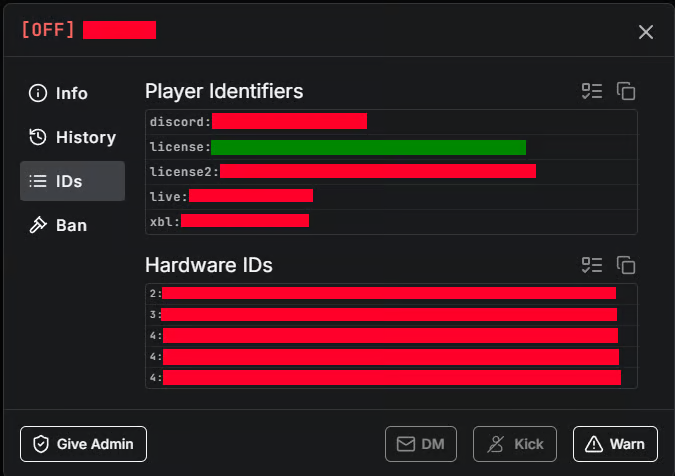
You can set the Allowed members that will be authorised to place, edit and delete your EV Charging Stations. You can grab you License from your TxAdmin Console.\
\ 
```lua
Config.AllowedLicenses = {
["license:############"] = true, -- Set to true to allow
["license:############"] = false, -- Set to false to disable
["license:############"] = false,
}
```
{% endhint %}
***
#### Edit Menu Autodetection
{% hint style="info" %}
The edit menu allows for autodetection if configured to do so, this will make it so you can walk within the set Distance and it will automatically open the edit menu rather than using the /editEV command.
```lua
Config.EnableAutoEditDetection = false
Config.AutoEditDistance = 2.0
```
{% endhint %}
***
#### Keybindings
{% hint style="info" %}
The Keybindings to move the prop around during placement and editing can be customised in the Config file to ensure it doesn't clash with other script you may have. The keybinds can be found here -> [CLICK HERE](https://docs.fivem.net/docs/game-references/controls/)
```lua
Config.Buttons = {
MoveForwards = 111,
MoveBackwards = 112,
MoveLeft = 108,
MoveRight = 109,
MoveUp = 172,
MoveDown = 173,
RotateForwards = 117,
RotateBackwards = 118,
RotateLeft = 175,
RotateRight = 174,
SnapToGround = 143,
SaveProp = 176,
}
```
{% endhint %}
***
#### Vehicle Configuration
{% hint style="info" %}
In this section you can set the vehicles you wish to ALLOW to charge at these locations, this could include Emergency vehicles if you have a modern fleet of EV service vehicles.
```lua
Config.AllowedVehicles = {
-- Electric Cars
["omnisegt"] = {name = "Obey Omnis e-GT"},
["imorgon"] = {name = "Imorgon"},
["neon2"] = {name = "Pfister Neon 2"},
["iwagen"] = {name = "Coil iWagen"},
["cyclone2"] = {name = "Coil Cyclone II"},
["neon"] = {name = "Pfister Neon"},
["raiden"] = {name = "Coil Raiden"},
["tezeract"] = {name = "Pegassi Tezeract"},
["voltic"] = {name = "Coil Voltic"},
["voltic2"] = {name = "Coil Voltic 2"},
["surge"] = {name = "Karin Surfer"},
-- Emergency Vehicles (Electric)
["police"] = {name = "Police Cruiser"} --If Electric
}
```
{% endhint %}
***
## Config File before edits
```lua
Config = {}
Config.Debug = false
Config.Framework = 'auto' -- 'auto', 'esx', 'qbcore', 'standalone'
Config.UseLocations = false -- Pre-configured locations for charging stations to get you started.
Config.ChargingStationRadius = 5.0
Config.UseBlips = true
Config.FuelSystem = {
enabled = true,
type = 'auto', -- 'auto', 'legacyfuel', 'ox_fuel', 'cdn-fuel', 'ps-fuel', 'standalone'
exportName = 'LegacyFuel' -- Export name for the fuel system
}
Config.Billing = {
enabled = true,
method = 'bank', -- 'bank', 'cash', 'both'
checkFundsFirst = true, -- Check if player has enough money before allowing charging
notifications = {
enabled = true, -- Enable/disable billing notifications
showOnComplete = true, -- Show notification when charging completes
showOnCancel = true, -- Show notification when charging is cancelled
showPaymentMethod = true -- Show which payment method was used (bank/cash)
}
}
-- Charging Characteristics --
-- EXAMPLE -- 25% needed ÷ PercentagePerKWh (2.0) = 12.5 kWh × ChargeCost Per KWh (1.0) = £13 (rounded to next whole pound)--
Config.TimePerPercent = 0.3 -- Time in seconds per 1% charge
Config.MaxChargeLevel = 100
Config.ChargeCost = 1.0 -- Cost per kWh in currency
Config.MinChargeAmount = 1 -- Minimum charge amount percentage
Config.PercentagePerKWh = 2.0 -- Percentage of charge per kWh
Config.RequireDriverSeat = false
Config.FlashHazardsWhileCharging = true
-- Notification settings --
Config.Notifications = {
type = 'qbcore', -- 'chat', 'mythic', 'ox_lib', 'esx', 'qbcore', 'okokNotify', 'pNotify', 'NotificationV2', 'custom'
position = 'top-right', -- Position for certain notification systems
duration = 5000, -- Duration in milliseconds (5 seconds)
sound = true, -- Play sound with notifications (if supported)
-- Notification filtering - only show important notifications
showLevel = 'important', -- 'all', 'important', 'critical'
-- 'all' = Show everything (inform, success, error, warning)
-- 'important' = Show success, error, warning (skip basic info)
-- 'critical' = Show only error and warning (critical issues only)
}
-- Placement Menu Options --
Config.AllowedLicenses = {
["license:############"] = true,
["license:############"] = false,
["license:############"] = false,
}
Config.EnableAutoEditDetection = false
Config.AutoEditDistance = 2.0
Config.Buttons = {
MoveForwards = 111,
MoveBackwards = 112,
MoveLeft = 108,
MoveRight = 109,
MoveUp = 172,
MoveDown = 173,
RotateForwards = 117,
RotateBackwards = 118,
RotateLeft = 175,
RotateRight = 174,
SnapToGround = 143,
SaveProp = 176,
}
-- Vehicle Configuration --
Config.AllowedVehicles = {
-- Electric Cars
["omnisegt"] = {name = "Obey Omnis e-GT"},
["imorgon"] = {name = "Imorgon"},
["neon2"] = {name = "Pfister Neon 2"},
["iwagen"] = {name = "Coil iWagen"},
["cyclone2"] = {name = "Coil Cyclone II"},
["neon"] = {name = "Pfister Neon"},
["raiden"] = {name = "Coil Raiden"},
["tezeract"] = {name = "Pegassi Tezeract"},
["voltic"] = {name = "Coil Voltic"},
["voltic2"] = {name = "Coil Voltic 2"},
["surge"] = {name = "Karin Surfer"},
-- Emergency Vehicles (Electric)
["police"] = {name = "Police Cruiser"} --If Electric
}
-- Localization
Config.Locale = {
['not_electric_vehicle'] = 'This vehicle is not electric!',
['already_charging'] = 'This vehicle is already charging!',
['too_far_from_station'] = 'You need to be closer to a charging station!',
['not_driver'] = 'You must be the driver to start charging!',
['charging_started'] = 'Charging started! Cost: £%.2f per kWh',
['charging_complete'] = 'Charging complete! Total cost: £%.2f',
['charging_cancelled'] = 'Charging cancelled!',
['insufficient_funds'] = 'Insufficient funds to pay for this charging session!',
['checking_funds'] = 'Checking available funds...',
['funds_check_failed'] = 'Unable to verify funds. Please try again.',
['vehicle_locked'] = 'Vehicle locked during charging',
['vehicle_unlocked'] = 'Vehicle unlocked',
['station_occupied'] = 'This charging station is occupied!',
['interact_to_charge'] = '[E] Open Charging UI',
['interact_to_stop'] = '[E] Open Charging UI'
}
---------------------------
---- OPTIONAL SETTINGS ----
---------------------------
Config.BlipSprite = 354
Config.BlipColor = 2
Config.BlipScale = 0.8
Config.BlipText = "EV Charging Station"
-- Charging stations locations -- DO NOT EDIT THIS UNLESS YOU KNOW WHAT YOU ARE DOING
Config.ChargingStations = {}
```